
Today I am going to be sharing with you free quotex indicator, pocket option and other brokers indicators files so you can download and trade with the help of these indicators and how you can add otc pairs in mt4 and also how you can install a custom indicator into your meta trader 4 and also your meta trader 4/5. for this we’re going to be using a meta trader 4 and also same principles also apply to the meta trader 5 as well so you’re going to do the same also for meta trader 5 if you want to add a custom indicator into your chat or your mt4 so you can also do the same.
You will find free Indicators files at bottom of this page. I have multiple indicators and bot on daily basis I will upload new indicator or bot for my followers. Visit this page on daily basis so you can download free indicators and their setup.
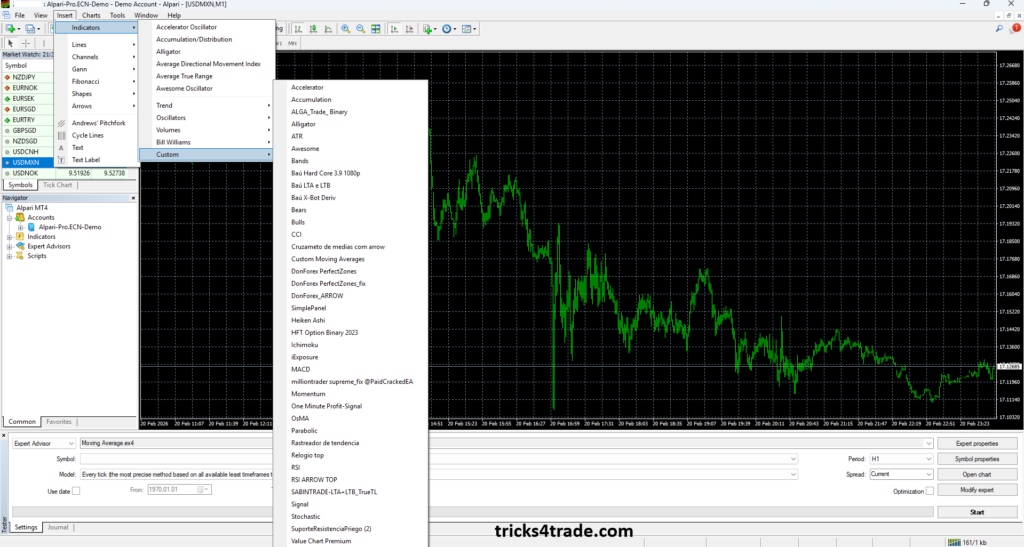
MT4/ MT5 Software Overview
first is you want to go over to view your indicator which you have already so you want to go over to the view and you want to go over to the navigator and you have here the account all right you have various accounts you have the next one you also have your indicators all right which you have here so some of this comes with um by default okay so they come with the mt4 or mt5 so you can also find them here so you have some coming in with your empty phone all right you have a few all right the average directional movement index also the Bollinger bands all right also the envelopes so you have few of these coming with your mt4 all right so few of also this are pre-installed all right so few of these are custom installed. I am going to show you how you can also install this into your mt4 and also use this into your on your mt4 also with real shortcuts as well which can also help you in your trading journey all right
How to install Indicator Files and Template
For installation Mt4 you can easily find is setup from Google search or you can download from here .
Steps for Indicator Files Installation
- First you have to go to the Files in top bar in your MT4
- Open Data Folder
- Now open MQL4 Folder
- Open Indicators Folder
- Just simply copy your custom indicator files.
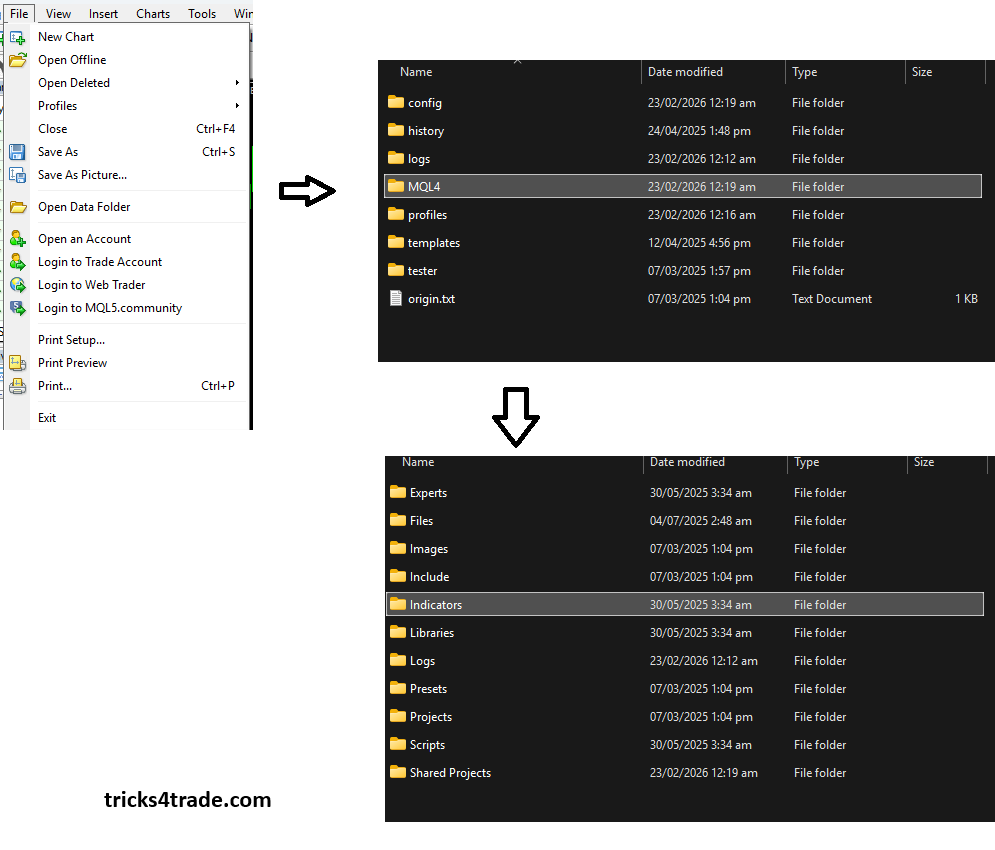
- After copying indicator file then restart your software
- Open your desired Pair/ Chart
- Go to navigation, then indicator and double click on you custom indicator
Now your custom indicator is ready to be use
Steps for Template installation (Free Quotex Indicator)
Same process will be repeated for template.
- First you have to go to the Files in top bar in your MT4
- Open Data Folder
- Now open MQL4 Folder
- Open Template Folder
- Just simply copy your custom template files.
- After copying template file then restart your software
- Open your desired Pair/ Chart
- Go to navigation, then indicator and double click on you custom indicator and template.
How to Add Otc charts/ Pairs in MT4 (Free Quotex Indicator)
First for running or add Otc pairs in your mt4 you have to add EA files and also need otc license for quotex, pocket option or any broker from here.
Steps for installation EA file into your MT4
- First you have to go to the Files in top bar in your MT4
- Open Data Folder
- Now open MQL4 Folder
- Open Expert Folder
- Just simply copy your EA files.
- After copying EA file then restart your software
- Go to navigator in your mt4 and find Expert Advisor section click on that and you will find Eabibot file.
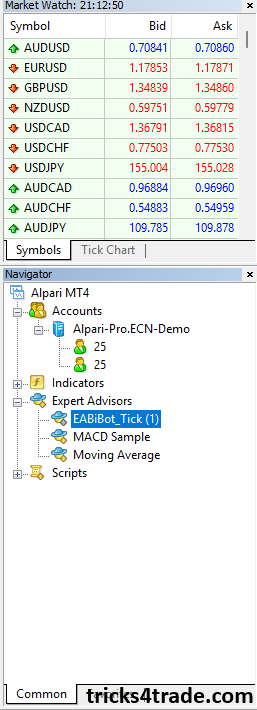
- Simply open or click on eabibot file and go to Common section
- Click on Allow DLL Imports.
- After that go to Input section and select your broker
- Write or paste your Otc License which we was received from Bibot telegram channel and click ok
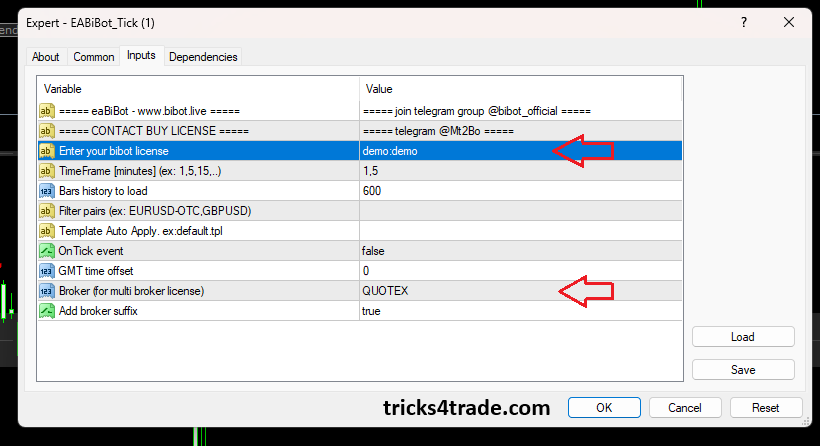
Then you will receive this type of window as I shown in below picture
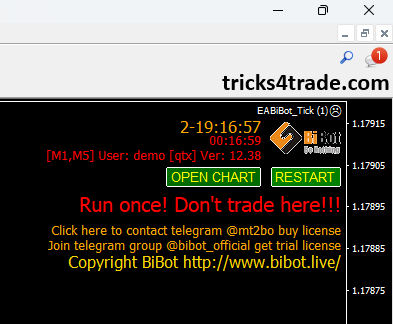
Now simply click on open chart and you will see all otc pairs. Free Quotex Indicator
MT4 Signal Alert on your device/ mobile
set an alert on mt4 open your mt4 in your trading terminal select alert right-click anywhere then select create a new window will pop up where you can set up the alert conditions as per your preference in the action drop-down menu you can find the alert notifications in our case we will select sound at the right side you will find the expiration section where you can select the specific date and time when the alert will expire or be cancelled this field is not necessary to be ticked unless you wish to set it moving to symbols you can find and select the instrument for which you wish to activate the alert notification under section condition we can select whether to place the alert below or above the bid price below or above the ask price or at specific time therefore at the value section we will place the desired price at which we wish to be notified or the specific time at section source you can choose the sound for the alert from the listed in the drop down menu or simply click at the dotted icon on your right hand and upload your customized tone the last two options at the bottom are timeout which will be the time frame that the alert will be ringing and the maximum interactions is the number of rings before it gets paused.
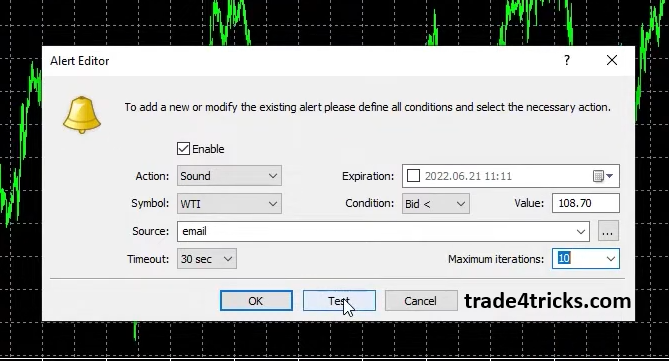
Click at the test button and you will be able to hear the notification sound then click ok you can now see the alert in your terminal and also on your chart.
I have multiple indicators and bot, on daily basis I will upload new indicator here in given link for my followers. Visit this page on daily basis so you can download free indicators and their setup.
Click on download free and you will get list of free indicators.
For any information feel free to contact us. Thanks
Pingback: Download Free Quotex Indicator Bot - tricks4trade.com
Pingback: 100% Win Quotex Sureshot Pattern - tricks4trade.com
Pingback: Top Quotex Sureshot Pattern - tricks4trade.com